Stay Cyber Safe
Financial institutions are seeing increased attempts to gain member account information through text scams, phone calls, and email phishing attempts. ICCU will never contact you and request you to provide secure or personal account information such as usernames, passwords, security codes, social security numbers, or any other information pertaining to your account security. Please contact us if you have questions or concerns about a text, phone call, or email.
Learn From The Experts
Clicking links, opening attachments, or responding to suspicious emails can lead to data breaches, virus attacks, ransomware or more. We have turned to the security experts to provide some tips to help you avoid being vulnerable to suspicious texts, emails, and calls.
If you have received such a message, do not respond to the request. Instead, forward the message to scam@iccu.com. We will handle it from there.
Identity Theft Services
with Central Plus Checking
With a Central Plus Checking Account you get access to top-tier Fully Managed Identity Theft Resolution Services and Dark Web Monitoring. These services are dedicated to keeping your personal information across the web safe, while providing recovery services if needed.
How to Stay Secure
Just as we strive daily to keep you safe from cybersecurity threats, there are some things you can do too. Below are a few smart practices and information available to you here at ICCU that can keep your personal and financial information safe.

Create secure passwords
Log in to your eBranch Online Banking and create a new password, and reset it often.
Monitor your information
Identity theft is no laughing matter. Access CardControl and My Credit from ICCU to make sure your identity and transactions stay YOURS.
Check URLs for websites
Checking URLs before clicking on any link (even sites found in search engines) is crucial to avoid phishing websites. It helps ensure that you are visiting legitimate and secure online destinations, protecting your personal information and online security.
Use multi-factor authentication
MFA requires you to provide another verification factor along with your password to access your account.
Personalized account alerts
Set up email or text alerts within eBranch online banking. Financial alerts can be set up for balances, checks, and other transactions.
Keep your technology updated
It is important to keep your software, operating system, and antivirus programs up to date to protect against known vulnerabilities.
For any additional questions you may have on how to better protect yourself from security threats please contact us.
How ICCU Protects You
Keeping your personal and business account information safe is a top priority at ICCU. Read more about personal internet banking safety to learn how ICCU protects your personal information and what you can do to keep your online transactions safe. If you own a business, read about business internet banking safety.
ICCU also offers ongoing automatic card fraud monitoring, free access to My Credit, and the option to review our privacy policy and online policy. Check out a few more services and tools we offer to help keep you secure.

Improve Online Security

The internet is a dream come true and makes our lives easier. However, in the wrong circumstance, it can become a nightmare. We want you to feel confident in your ability to navigate the web. We’ve put together a few tips and tricks to help you feel secure while online.
- Be alert for fraudulent or suspicious emails. Don’t ever provide any personal information via email.
- Keep your computer safe with a firewall and anti-virus software. Make sure updates run automatically.
- Protect your passwords. Never use your ICCU password on other websites.
- Only shop on secured websites.
- Continue to stay educated in security procedures and best practices.
Improve Account Security
At ICCU, our goal is to help members achieve financial success. One way we do this is by instilling trust and loyalty in all aspects of your finances, especially account security. Here are a few ideas to help you become a pro in keeping your finances secure.
- Set up and utilize all CardControl features.
- Never give your credit card number over the phone unless you are dealing with a reputable company or initiated the call yourself.
- Report lost or stolen cards immediately.
- Make a record of your credit card account numbers and telephone numbers for reporting lost or stolen cards. Keep it in a safe place.
- When selecting a PIN, always avoid the obvious. Memorize it.
- Regularly review your account statements.

How to Report Fraud
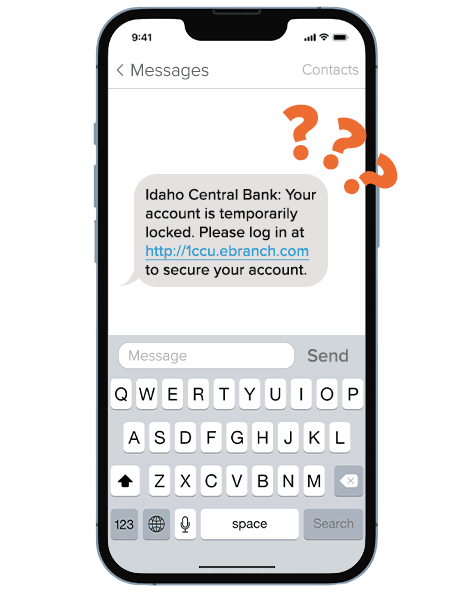
If you feel like you have been a victim of identity theft or have received any texts, calls, or emails from ICCU that appear to be suspicious, contact us. Check out some additional steps you can take to stay cyber-safe:
- Contact one of the three major national credit bureaus: Equifax, Experian, and TransUnion. Request a copy of your report to check for any suspicious activities, inquiries, or delinquencies. If found, place a fraud alert on your credit report.
- File a police report.
- Contact any other creditors who deal with your money (i.e. other financial institutions, accountants, lenders, etc.).
- Contact other agencies, as appropriate, such as US Postal Inspectors, Social Security, etc.
- Report the identity theft to the Federal Trade Commission (FTC) by calling (877)-ID-THEFT or by visiting their website.
If you have received what appears to be a phishing email pretending to be from ICCU, do not respond to the request. Instead, forward the email to scam@iccu.com. We will handle it from there.
Already Clicked on a Phishing Link?
Scammers are getting more deceptive making it easier for people to fall victim to their tricks. If you have already clicked on a phishing link or feel like your information may be compromised, perform these steps now.
- Ensure your device has not been infected with malware or spyware. For assistance, contact a trusted local computer / cell phone repair location.
- Change your eBranch username and password. You can do this by visiting your security settings. For further assistance, please contact us.
- Change your email password. Many malicious links are designed to intercept this data and can result in further compromises.
- Notify ICCU of any unauthorized activity in your accounts. If unauthorized activity is present, additional steps may be necessary to prevent further fraud.

Scams & Fraud
Scams can begin through an unexpected message, online interaction, or someone you trust. Explore common scam types, learn what to watch for, and find clear next steps if you think you have been affected.
Phishing & Impersonation Scams
Learn to spot phishing attempts and scammers who pose as ICCU, trusted organizations, businesses, or people you know.
Online & Social Media Scams
Learn to spot scams involving social media, online shopping, job offers, investments, and other digital interactions.
Relationship & Trust Scams
Learn to recognize scammers who build or misuse personal relationships to gain your trust.